RevitWorks DOOR FACTORY Premium for Revit 27.0.00 (Create Doors in Minutes with Powerful Automation, Though with Some Customization Limits)
Download the RevitWorks DOOR FACTORY Premium for Revit 27.0.00 (Create Doors in Minutes with Powerful Automation, Though with Some Customization Limits) from this link…

Summary
Designing custom doors in Revit can quickly eat up hours of your workday. Between navigating the Family Editor, managing parameters, and ensuring everything works in 3D walkthroughs, what should be a simple task often becomes a major bottleneck.
RevitWorks DOOR FACTORY Premium is built to solve exactly this problem. This Revit add-in helps you design and build any type of door—from standard swinging doors to complex operable walls—in minutes instead of hours. It works for both beginners and experts.
Recently updated to version 27.0.00, the tool now fully supports Revit 2025, 2026 and 2027, offering 44 different door actions, completely customisable jambs and trims, user-defined components, and smart parameter mapping.
What is RevitWorks DOOR FACTORY Premium?
RevitWorks DOOR FACTORY Premium is a specialised add-in for Autodesk Revit that allows users to create, customise and place door families without ever entering Revit’s native Family Editor.
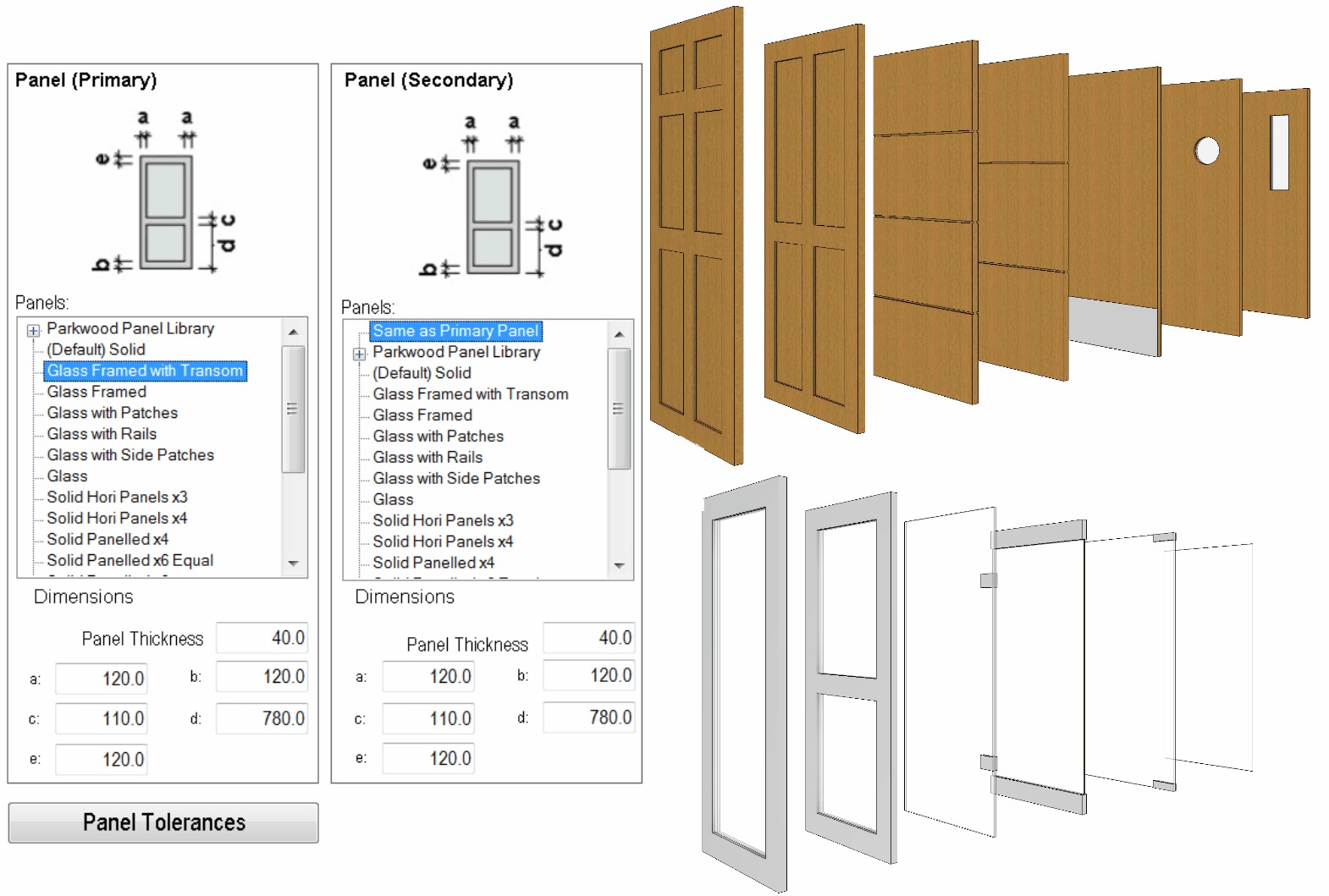
Rather than building doors from scratch, the software provides an intuitive interface where you select the door action (swing, pivot, slider, bi-fold, etc.), configure jambs, choose panels, add trims and handles, and then load a fully functional, parameter-driven door family directly into your project. The tool supports both standard and curtain panel door creation.
Target users include:
-
Architects and architectural designers
-
BIM managers and coordinators
-
Interior designers
-
Revit modellers and technicians
-
Architectural firms of all sizes
Key Features
| Feature Category | Capabilities | Real Benefit |
|---|---|---|
| 44 Door Actions | Swing doors, pivot doors, surface sliders, pocket sliders, wardrobe sliders, bi-fold doors (14 configurations), garage doors, single/double hatches, interconnecting (hotel) doors, stacking (operable wall) doors | No door type is out of reach. Create exactly what the project requires. |
| Multiple Jamb Types | Timber and steel profiles; fully configurable dimensions | Match real-world construction details accurately. |
| Huge Panel Selection | Glass and solid panels; copy, customise and add to library; all open in 3D for walkthroughs | Visual accuracy improves client presentations and coordination. |
| Parameter Mapping | Rename default parameters to match any office or industry standard | Ensures door schedules are compliant and consistent across projects. |
| Universal Controls | Consistent tools for wall fitting; swing/flip controls; jamb width matching; alignment from centre, interior or exterior face | No learning curve for different door types—one workflow fits all. |
| User Components | Add sills, pelmets, decorative mouldings, over-panels, 2D details; components flex with door dimensions | Create truly unique doors for bespoke designs. |
| Centralised Configuration | Multi‑user support; shared content and settings across teams | Entire office works from the same library—no duplication or inconsistency. |
Pricing & Plans
| Plan | Revit Version | Key Inclusions | Price (USD) |
|---|---|---|---|
| PREVIEW Add‑in | Full Revit 2027, 2026, 2025 | Single & double swing doors; customisable panels & handles; configurable jambs & trims; parameter mapping; universal controls | FREE |
| Premium Add‑in | Full Revit 2027, 2026, 2025 | Everything in PREVIEW plus: 44 door actions; user components; custom trim profiles; flexible licensing | from $522 |
| Premium Suite | Full Revit 2027, 2026, 2025 | Door Factory Premium + Electrical Premium + Standard Casework + Standard HVAC + Fixings & Flashings | from $1,627 |
| Standard (for Revit LT) | Revit LT | Pre‑built door families (100+); configurable jambs & trims; custom panels & handles; universal controls | from $525 |
Upgrade Pricing:
Existing customers can upgrade to the latest Revit version at reduced rates. First upgrade license:$208 USD; 2–20 upgrade licenses: $63 USD each; 21–40 upgrade licenses:$51 USD each.
Additional Licenses: $159 USD per user.
All pricing in US dollars. Local sales tax may apply.
Licences never expire for the specific Revit version purchased; annual upgrades are optional.
Limited‑time offer: Eligible professionals and firms may qualify for up to 50% OFF on select premium plans – contact the official sales team for details.
Use Cases
| Use Case | How DOOR FACTORY Premium Helps |
|---|---|
| Residential Architecture | Create swing, sliding and bi-fold doors for homes with custom panel and trim combinations. |
| Commercial & Hospitality | Interconnecting (hotel room) doors, stacking operable walls, and fire-rated assemblies. |
| Healthcare & Institutional | Consistent door families across large campuses; parameter mapping to facility standards. |
| Interior Design | Rapid iteration of door styles; 3D open/close for visual presentations. |
| BIM Coordination | Centralised content ensures every team member uses the same door families. |
| Small Firms / Solo Practitioners | Free PREVIEW version covers basic swing doors; Premium adds full capabilities when needed. |
Who Should Use This Software
Beginners
Yes—the interface is intuitive, and the PREVIEW version is free, so you can learn without commitment. Users report that even Revit novices can build a door in under two minutes.
Professionals
Absolutely. Parameter mapping, centralised configuration, and 44 door actions give you the depth required for serious production work.
Agencies & Multi‑user Firms
The tool is specifically designed for multi‑user environments. Centralised content and settings ensure consistency across all projects and team members.
When NOT to Use This Software
DOOR FACTORY Premium is excellent for what it does, but it is not a universal Revit solution:
-
If you only need standard single and double swing doors, the free PREVIEW version is sufficient; you do not need the Premium upgrade.
-
It is not a full BIM authoring platform—it complements Revit but does not replace it.
-
The tool is Revit‑specific; it does not work with ArchiCAD, Vectorworks or other BIM platforms.
-
If your firm uses a proprietary library of door families that already meets all needs, the add‑in may be redundant.
-
Revit LT users cannot use the Premium add‑in; they need the separate STANDARD product (a Revit project file, not an add‑in).
RevitWorks DOOR FACTORY Premium vs Competitors
| Tool/Platform | Approach | Door Actions | Custom Components | Parameter Control | Pricing Model |
|---|---|---|---|---|---|
| DOOR FACTORY Premium | Add‑in for full Revit | 44 actions (swing, pivot, slider, bi‑fold, operable wall, etc.) | Trims, sills, pelmets, handles, over‑panels; user‑defined | Full parameter mapping; rename to any standard | One‑time purchase |
| Preview (free version) | Add‑in for full Revit | Single & double swing only | Limited (no custom trims/user components) | Basic mapping | Free |
| CTC SuperDoor Configurator | Add‑in for Revit | Standard door assemblies | Limited; focuses on hardware & scheduling | Standard Revit parameters | Subscription |
| dormakaba EntriWorX | Free Revit plugin | Not a creator; focuses on door scheduling | No; primarily for hardware specification | Not applicable | Free |
| BIMobject Plug‑In | Free Revit plugin | Infinite (manufacturer‑specific) | Manufacturer‑provided models only | Fixed by manufacturer | Free (ad‑supported) |
| Manual Revit Family Editor | Native Revit | Any (but time‑consuming) | Fully custom | Full control, high effort | Included with Revit |
DOOR FACTORY Premium stands out for:
-
44 door actions – far more than most competitors
-
Full customisation of trims, panels, handles and user components
-
Parameter mapping – rename parameters to match any standard, office, or client requirement
-
One‑time payment – no ongoing subscription fees
-
Centralised multi‑user configuration – firm‑wide consistency
For users who primarily need door scheduling and hardware coordination, the free EntriWorX plugin from dormakaba is a solid complementary tool. For those needing a wide range of manufacturer‑specific BIM objects, BIMobject is a good free resource. However, for rapid, custom, production‑ready door family creation directly within Revit, DOOR FACTORY Premium is the leading solution.
System Requirements
| Component | Requirement |
|---|---|
| Software | Autodesk Revit 2025, 2026, or 2027 (full version; Revit LT requires the STANDARD product, not the Premium add‑in) |
| Operating System | Windows 10, 11 (64‑bit) – compatible with Revit’s OS requirements |
| Memory | 8 GB RAM minimum (16 GB recommended, in line with Revit requirements) |
| Disk Space | 500 MB for installation; additional space for custom content |
| Display | 1920 x 1080 or higher recommended |
| Internet | Required for download and license activation |
Specifications align with standard Revit system requirements.
How to Use RevitWorks DOOR FACTORY Premium
| Step | Action |
|---|---|
| 1 | GET THE FREE TRIAL (PREVIEW) – Visit the official RevitWorks website and download the free PREVIEW version, which includes all basic door actions at no cost. |
| 2 | INSTALL – Run the installer. The add‑in integrates directly into your Revit ribbon. |
| 3 | LAUNCH – Open a Revit project, click the DOOR FACTORY icon, and the configuration panel appears. |
| 4 | SELECT DOOR ACTION – Choose from swinging, pivoting, sliding, bi‑fold, garage, interconnecting, stacking or other door behaviours. |
| 5 | CONFIGURE JAMBS – Set jamb type (timber, steel), dimensions and alignment within the wall (centre, interior face, exterior face). |
| 6 | CHOOSE PANELS – Select from glass or solid panels; copy, customise or add your own to the library. |
| 7 | ADD TRIMS, HANDLES & COMPONENTS – Incorporate interior/exterior trims, handles, sills, pelmets, decorative mouldings, over‑panels or 2D details. |
| 8 | MAP PARAMETERS (optional) – Rename default parameters to match your office, client or industry standard naming conventions. |
| 9 | LOAD FAMILY – Click “Create”. The fully functional door family loads directly into your Revit project, ready for placement and scheduling. |
| 10 | CONFIGURE FOR MULTI‑USER (if applicable) – Set centralised content and settings so your entire team accesses the same libraries. |
Pros and Cons
Pros
Rapid door creation – build a door in less than two minutes once you learn the workflow
44 door actions – unparalleled variety, including operable walls and interconnecting doors
No Family Editor required – stay focused on design without deep Revit family editing
Fully customisable – panels, trims, handles, user components (sills, pelmets, mouldings, over‑panels)
Parameter mapping – rename parameters to match any standard or client requirement
Multi‑user ready – centralised configuration for firm‑wide consistency
Perpetual licence – one‑time purchase; never expires for the Revit version you buy Free PREVIEW version – test basic door creation at no cost before upgrading
Cons
Windows only – requires Windows operating system (same as Revit)
Revit LT users cannot use the Premium add‑in; they must purchase the STANDARD product (pre‑built families, not interactive add‑in)
Annual upgrade cost – upgrades to new Revit versions incur fees (first upgrade $208 USD, then $63 per licence)
Not a BIM platform – it is an add‑in, not a replacement for full BIM authoring
Best for door‑heavy workflows – if your projects use very few doors, the investment may be harder to justify
Expert Recommendation
DOOR FACTORY Premium is an excellent investment for any architectural practice that regularly creates custom door families in Revit.
For small firms or solo practitioners, start with the free PREVIEW version. It covers single and double swing doors—the most common types—and the workflow is identical to the Premium version. Only upgrade if you regularly need sliders, bi‑folds, operable walls or custom user components.
For medium to large firms, the Premium version pays for itself quickly. One architect noted the tool “saves so much time and affords such consistency in door creation that it pays for itself within days of purchase”. The centralised multi‑user configuration and parameter mapping are particularly valuable for firm‑wide consistency.
For specialist practices (healthcare, hospitality, education, residential developers), the full range of 44 door actions and custom user components will dramatically speed up project delivery.
Our advice: Download the free PREVIEW version today. Within an hour, you will know whether the workflow suits your practice. If you need more than swing doors, the Premium upgrade is a straightforward, worthwhile investment.
Best Alternatives
| Alternative | Type | Best For | Pricing |
|---|---|---|---|
| DOOR FACTORY PREVIEW (free) | Revit add‑in | Single/double swing doors only; same workflow as Premium | Free |
| CTC Software SuperDoor Configurator | Revit add‑in | Door assemblies, hardware and scheduling; less focus on door type variety | Subscription (contact for pricing) |
| dormakaba EntriWorX BIM Plugin | Free Revit plugin | Door scheduling and hardware specification; door creator? No | Free |
| BIMobject Plug‑In | Free Revit plugin | Access to manufacturer‑specific BIM objects (including doors) | Free |
| Manual Family Editor | Native Revit | Full control; slow and complex | Included with Revit |
For most users, the decision comes down to:
-
Free and basic swing doors → DOOR FACTORY PREVIEW
-
Full door variety + custom components → DOOR FACTORY Premium
-
Door scheduling + hardware specification → EntriWorX (free, complementary to DF)
-
Manufacturer‑specific objects → BIMobject (free, complementary)
-
Deep custom family editing → Manual Family Editor
AEO OPTIMIZATION (CRITICAL)
Quick Answers (Featured Snippets)
What is RevitWorks DOOR FACTORY Premium?
RevitWorks DOOR FACTORY Premium is an add‑in for Autodesk Revit that allows architects and designers to create custom door families without using Revit’s native Family Editor. It supports 44 different door actions, fully customisable jambs, panels, trims, handles and user components, and works with Revit 2025, 2026 and 2027.
Is it free or paid?
There is a free PREVIEW version that includes single and double swing doors. The Premium version costs from $522 USD (one‑time purchase) and adds 44 door actions, user components and custom trim profiles. A free trial (PREVIEW) is available unlimited.
Is it safe and legal?
Yes, DOOR FACTORY Premium is 100% safe and legal when downloaded from the official RevitWorks website. Always avoid unauthorised sources that may distribute modified or harmful versions. The software is developed by RevitWorks Ltd, a trusted provider of Revit add‑ins.
Who should use it?
DOOR FACTORY Premium is ideal for architects, BIM managers, interior designers and Revit modellers who regularly need to create custom doors in Revit. Small practices can use the free PREVIEW version; larger firms benefit from the full 44 door actions, user components and centralised multi‑user configuration.
What are the main benefits?
Build a door in under two minutes, avoid the Family Editor, access 44 door actions (swing, pivot, slider, bi‑fold, operable wall, etc.), fully customise panels, trims and user components, map parameters to any naming standard, and maintain firm‑wide consistency with centralised configuration.
FAQs (MINIMUM 5)
-
Is RevitWorks DOOR FACTORY Premium free or paid?
The PREVIEW version is free and includes single and double swing doors. The Premium version is paid (from $522 USD) and adds 44 door actions, user components and custom trims. A free trial (PREVIEW) is available unlimited. -
Is there a free trial?
Yes, the PREVIEW version serves as a free trial. It never expires, includes all basic door actions, and runs on the same workflow as Premium. You can use it indefinitely for swing doors, then upgrade when you need more advanced capabilities. -
Is it safe and legal?
Absolutely. DOOR FACTORY Premium is a legitimate commercial product from RevitWorks. Always download from the official website. Avoid any unauthorised downloads or activation tools. -
What are the best alternatives to DOOR FACTORY Premium?
Top alternatives include: the free PREVIEW version (swing doors only), CTC SuperDoor Configurator (door assemblies & hardware), EntriWorX (free scheduling tool) and BIMobject (free object library). Manual Family Editor remains the ultimate fallback. -
Who should use this software?
DOOR FACTORY Premium is best for architects, BIM managers and interior designers who regularly create custom door families. The free PREVIEW version works for anyone needing swing doors. The Premium version is geared towards professionals needing the full range of door actions and custom components. -
What Revit versions does it support?
The current version supports full Revit 2025, 2026 and 2027. Revit LT users require the separate STANDARD product (pre‑built families, not the add‑in). Older versions may be available upon request.
CTA (SOFT & SAFE)
Ready to save hours of door‑creation time?
[Start Free Trial (PREVIEW)
[Get up to 50% OFF on Official Premium PlansLooking for full-version software without limitations? You’re in the right place. Instead of wasting time on unreliable or outdated sources, unlock a powerful bundle of 10k+ premium tools covering marketing, SEO, broadcasting, automation, and business productivity — all in one place at an affordable price. This collection is specially curated for freelancers, agencies, and business owners who want fast, real results with professional tools.
Direct contact: Telegram ID :
Join Us For Update Telegram Group :
Join Us For Updated WhatsApp group:
You Can test through AnyDesk before Buying,
And When You Are Satisfied, Then Buy It.
Unlimited PCs/Users.
Join today and upgrade your workflow with premium tools.