udiMagic (v12 Release 7.1) Smart Excel to Tally Data Import Automation Solution
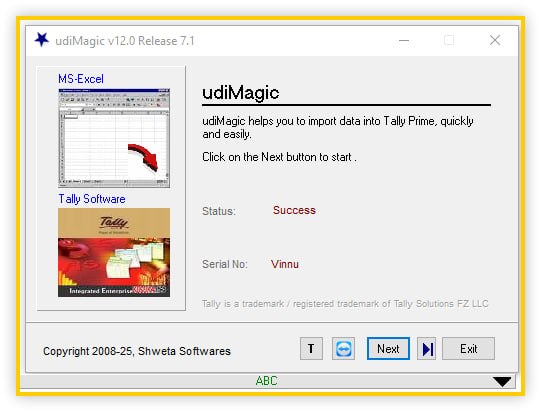
Download the udiMagic (v12 Release 7.1) Smart Excel to Tally Data Import Automation Solution from this link…

Summary
udiMagic is a specialized software designed to simplify the process of importing financial data from Excel into Tally accounting software. Businesses often manage large datasets such as invoices, ledgers, vouchers, inventory records, and tax-related details in spreadsheets, and manually transferring them into accounting systems can be time-consuming. udiMagic provides an efficient bridge between Excel and Tally, helping users automate the process with improved accuracy and reduced effort.
This intelligent solution is widely used by accountants, finance professionals, and organizations that rely heavily on spreadsheet-based workflows. Instead of repetitive manual entry, users can map Excel sheets into predefined templates, ensuring structured and error-free data migration. The software helps streamline financial workflows and improve productivity, making it a practical tool for businesses dealing with frequent data imports.
Why Excel to Tally Integration is Important for Businesses
Modern companies frequently manage operational data using Excel due to its flexibility and familiarity. However, accounting systems like Tally require structured formats to process financial records correctly. udiMagic resolves compatibility challenges by converting spreadsheet data into a format that can be directly imported into accounting systems without complex configurations.
This integration ensures businesses maintain consistency between operational and financial records. It also helps reduce the risk of duplication, calculation mistakes, and missing entries that often occur when transferring data manually. The ability to convert Excel sheets into accounting-ready formats strengthens workflow efficiency and enables faster financial reporting.
Simplifying Financial Data Conversion Processes
One of the main advantages of udiMagic is its ability to automate complex data conversion tasks. Financial datasets often contain hundreds or thousands of rows that must match the structure required by accounting software. It provides pre-designed templates that guide users in formatting their Excel data correctly before importing it into Tally.
These templates support various accounting entries including vouchers, purchase records, and ledger information. By standardizing the process, the software minimizes formatting issues and ensures smooth data transfer. This structured approach makes it easier for both beginners and professionals to handle financial data efficiently.
Enhancing Accuracy in Accounting Data Import
Accuracy is essential in financial management, as even small mistakes can impact financial reports and tax calculations. It helps maintain accuracy by providing automated mapping features that align Excel columns with accounting fields. This ensures that financial values are correctly interpreted during the import process.
Additionally, the software allows users to preview and validate data before completing the import process. This reduces the chances of errors and improves confidence in financial results. With reliable data handling, businesses can maintain transparency and compliance in their accounting operations.
Supporting GST and Modern Accounting Standards
Businesses operating in GST environments often require structured tax-related records. It supports GST-ready templates that allow users to import tax-related data easily into accounting systems. This functionality ensures that financial transactions comply with taxation standards and reporting requirements.
By supporting tax-related fields and structured entries, the software helps organizations maintain proper documentation. This capability is especially useful for companies handling multiple invoices or complex tax calculations, as it reduces the effort required for compliance management.
Improving Workflow Efficiency for Accountants
Professional accountants often deal with repetitive data entry tasks that consume valuable time. udiMagic improves workflow efficiency by enabling batch processing and one-click data import features. These automation capabilities reduce manual work and allow professionals to focus on analysis and financial planning instead of routine tasks.
Automation also helps maintain consistency across multiple accounting projects. Whether managing records for a single business or multiple clients, users can rely on standardized templates to maintain uniformity in financial reporting processes.
Flexible Template Mapping for Custom Data Structures
Every business may maintain data in a slightly different Excel format depending on workflow requirements. It provides flexibility by allowing users to create custom templates that match their existing spreadsheet structure. This adaptability eliminates the need to completely restructure Excel files before importing them into Tally.
Custom mapping options enable organizations to integrate unique accounting workflows without disrupting existing data management practices. This ensures smoother adoption and reduces the learning curve for new users. With customizable features, this software becomes suitable for businesses of various sizes and industries.
Batch Processing for Handling Large Data Volumes
Handling large datasets manually can be overwhelming, particularly when dealing with bulk financial transactions. It supports batch processing, allowing users to import multiple Excel sheets simultaneously. This capability significantly reduces processing time and improves operational efficiency.
Batch import functionality is especially beneficial for organizations dealing with monthly financial records, sales data, or inventory transactions. By automating repetitive tasks, the software enables faster completion of accounting processes while maintaining data accuracy.
Multi-Language Support for Global Businesses
Global businesses often work with multilingual datasets, especially when operating across different regions. It supports Unicode data, enabling users to import records in multiple languages including English and other international formats. This ensures compatibility with diverse business environments. Multilingual compatibility makes the software useful for international organizations managing financial data in different languages. It also helps maintain data integrity when transferring records from spreadsheets to accounting platforms without losing character formatting.
Enhancing Productivity Through Automation
Automation plays a significant role in modern accounting practices. It simplifies repetitive tasks through automatic import features, allowing users to process data quickly and efficiently. This helps organizations save time and improve productivity while maintaining accurate financial records. By reducing manual workload, professionals can focus more on financial planning, auditing, and analysis. The software contributes to a more organized workflow, making accounting operations smoother and more reliable.
Improving Financial Data Organization and Reporting
Organized financial data is essential for generating meaningful reports. It helps structure accounting information in a consistent format, enabling better reporting and analysis. Businesses can easily track transactions, review records, and prepare financial statements with improved clarity. Proper data organization also supports compliance with financial standards and improves transparency. By maintaining structured accounting records, companies can respond quickly to audits and financial reviews.
Reliable Solution for Accountants and Enterprises
It is widely recognized as a reliable solution for automating Excel to Tally data import processes. Its ability to handle complex datasets, provide structured templates, and maintain accuracy makes it a valuable tool for accounting professionals. The software supports modern accounting requirements and helps businesses manage financial data efficiently.
Organizations seeking a practical way to reduce manual data entry and improve financial accuracy can benefit from adopting udiMagic. Its automation capabilities, flexible templates, and structured workflow approach make it an effective solution for managing accounting data in a digital environment.
Our Paid Service
If you want to Purchase Cracked Version / KeyGen Activator /License Key
Contact Us on our Telegram ID :
Join Us For Update Telegram Group :
Join Us For Update WhatsApp group:
Crack Software Policies & Rules:
Lifetime Activation, Unlimited PCs/Users,
You Can test through AnyDesk before Buying,
And When You Are Satisfied, Then Buy it.